
September 1, 2024
TrainingUnderstanding ATIS: complete breakdown for student pilots
ATIS can sound like gibberish at first. Learn to decode every section and know exactly what to write down.
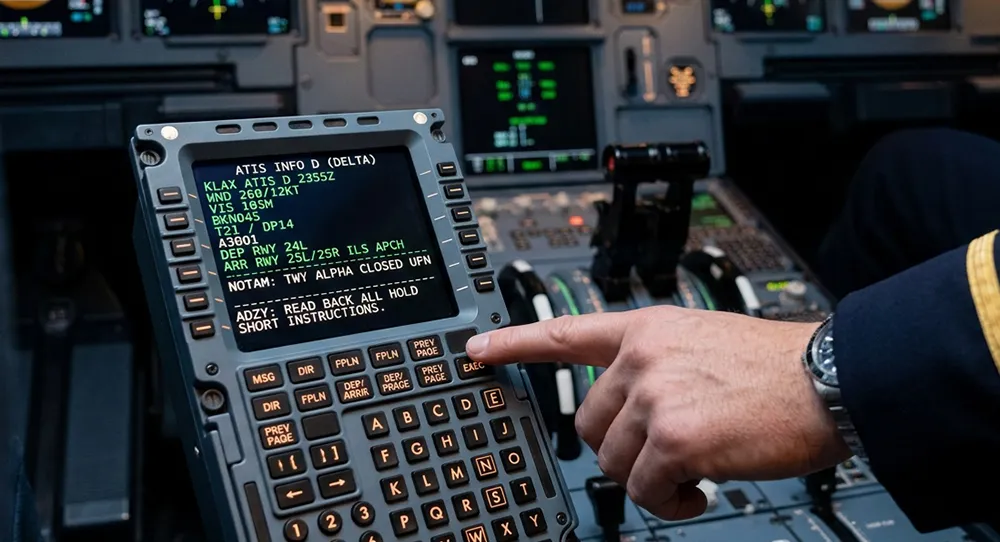
A complete guide covering everything you need to know. Estimated reading time: 7 min read.
"Oakland International Information Delta, time 1645 Zulu, wind 270 at 12 gusting 20, visibility 10, few clouds at 2,500, temperature 22, dewpoint 14, altimeter 30.15, ILS runway 27R approach in use, landing runway 27R and 27L, departing runway 27R, advise you have Delta."
If that sounds overwhelming, you're not alone. ATIS (Automatic Terminal Information Service) packs a lot of information into a quick broadcast.
This guide breaks down every section so you know exactly what to listen for and what to write down.
What ATIS is
ATIS is a continuous broadcast of current airport conditions. It's updated hourly or when significant weather changes occur.
Each update gets a new phonetic letter (Alpha, Bravo, Charlie, etc.) to identify it.
The ATIS structure
Every ATIS follows the same pattern:
- Airport name + Information letter
- Time (Zulu/UTC)
- Wind
- Visibility
- Weather/Clouds
- Temperature/Dewpoint
- Altimeter
- Approach/Runway information
- NOTAMs (if any)
- Instructions ("Advise you have...")
What to write down
You don't need to write everything. Focus on:
Critical items: - Information letter (Delta, Echo, etc.) - Wind (direction and speed) - Altimeter (30.15) - Runway in use (27R, 27L)
Example notation: ``` Info: D Wind: 270@12G20 Alt: 30.15 RWY: 27R/27L ```
That's all you need for your first call to Ground.
Decoding each section
Wind "Wind 270 at 12 gusting 20" - 270 = wind direction (from west) - 12 = steady wind speed (knots) - G20 = gusts up to 20 knots
Calm winds: "Wind calm" or "Wind 000 at 0"
Visibility "Visibility 10" - In statute miles - Can be "10" (excellent) down to fractions like "1/2" (poor)
Clouds "Few clouds at 2,500" - Few = 1/8 to 2/8 sky coverage - Scattered = 3/8 to 4/8 - Broken = 5/8 to 7/8 - Overcast = 8/8 (complete coverage)
Clear: "Sky clear" or "Clear below 12,000"
Temperature/Dewpoint "Temperature 22, dewpoint 14" - In Celsius - When they're close, expect fog/low visibility
Altimeter "Altimeter 30.15" - In inches of mercury - Set this in your altimeter before taxi
⚠️ Important: Critical: Wrong altimeter setting = wrong altitude indication
Runway information "Landing runway 27R and 27L, departing runway 27R" - Know which runway you'll use - May be different for landing vs departure
NOTAMs These are important! Listen for: - Taxiway closures - Light outages - Frequency changes - Equipment problems
Common ATIS challenges
Challenge #1: Fast speech Solution: Listen to the whole thing once, then replay (it loops) and write during second listening.
Challenge #2: Unfamiliar terminology Solution: Study the terms beforehand. They're standard.
Challenge #3: Missing information Solution: Listen again. It loops every 1-2 minutes.
When ATIS changes
If you get ATIS "Delta" but by the time you call Ground it's changed to "Echo":
What to say: "Oakland Ground, Cessna 1234 Bravo, west ramp, Information Delta..."
Ground will tell you: "Cessna 34 Bravo, Information now Echo, altimeter 30.12"
Your response: "Information Echo, altimeter 30.12, Cessna 34 Bravo"
Then update your altimeter setting!
AWOS vs ATIS vs ASOS
ATIS - Automated or live - Busy airports - Includes runway info and NOTAMs
AWOS (Automated Weather Observing System) - Fully automated - Smaller airports - No letter designation (gives observation time instead)
ASOS (Automated Surface Observing System) - Similar to AWOS - More advanced sensors - Used by NWS
For communications: If it's AWOS/ASOS without letters, say: "With the weather" instead of "Information Charlie"
Practice listening
Before your next flight:
- Find your airport on LiveATC.net
- Listen to ATIS 5 times
- Write down each one
- Check your accuracy
Apps like ATC One also include ATIS decoding practice with common formats from different airports.
Conclusion
ATIS seems complicated at first, but it follows a predictable pattern. After listening to it 10-20 times, you'll naturally know what's coming next.
Action item: Listen to ATIS at three different airports today. Write down the critical items from each. Practice until it's automatic.
Ready to practice what you just learned?
Reading is great, but real improvement comes from practice. ATC One lets you practice these exact scenarios with AI-powered voice recognition. Get instant feedback, build confidence, and master communications before your next flight.
About the author
Continue learning
 Training
ATC phraseology cheat sheet: the 20 most used phrases
Memorize these 20 essential phrases and you'll be ready for 90% of your communications. Includes pronunciation and real examples.
 Training
Traffic pattern communications: complete guide
Master communications for each leg of the pattern. Learn exactly what to say, when to say it, and how to stay safe in busy traffic.
 Training
VFR flight following: complete guide for student pilots
Flight following provides extra safety and helps you navigate complex airspace. Learn exactly when, how, and why to request it.